A client should be able to locate the next action in a legal update without searching through a wall of text. A colleague should be able to distinguish clause 1.1 from clause 11, and the PDF sent to a recipient should preserve the document that was approved. These are practical reasons to treat typography as part of document quality control.
For Indian advocates, in-house counsel and legal operations teams, font decisions involve three separate questions: what the receiving forum requires, what the reader needs, and what the font agreement permits. Keeping those questions separate makes it easier to build useful templates without turning a branding preference into an assumed filing rule.
Start with the destination of the document
Before adjusting type, identify whether the file is a court submission, an internal working draft, a client letter or a public website page. A house style can guide discretionary materials. For a filing, check the current rules, practice directions and technical instructions of the relevant court or tribunal before selecting font, size, spacing, margins and file format.
The Supreme Court of India maintains an official e-filing page linking its filing systems. That is a starting point for locating the relevant service, not proof that one formatting specification applies throughout India. Record the source and date of the instructions used by the team, and revisit them when the forum or filing process changes.
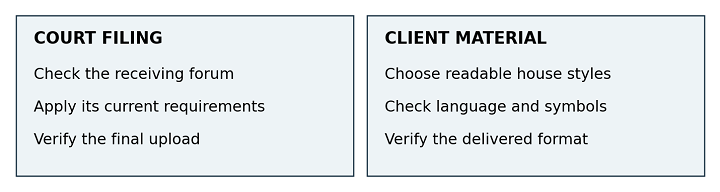
Two review routes for legal materials. A house style should accommodate the requirements of the receiving forum.
A familiar mistake with a simple cause
Consider an illustrative situation: a junior lawyer copies the firm’s client-letter template into a petition because it looks professional. The document inherits a decorative heading and compressed spacing. The problem is the unchecked template choice. Create separate template categories so that the team starts from the correct document type before anyone edits the wording.
Keep original evidence separate from newly drafted material. A readability exercise should never silently reformat an executed agreement or replace a source exhibit. If a working transcription is useful, identify it clearly and preserve the original for verification. The typography review concerns presentation; the legal team remains responsible for content and procedure.
Make the page answer the reader’s questions
A useful client update gives the reader an order: the issue, the current position, the documents needed and the next step. Use descriptive headings, short paragraphs and selective emphasis. When every line is bold or capitalised, the reader loses the clues that distinguish an instruction from background information.
A heading such as “Documents to send” tells the client what the section contains. A heading such as “Miscellaneous” does not. Put a response date next to the relevant action, and specify who should act. Do not rely on colour alone to distinguish a required step from an optional one, particularly in documents likely to be printed.
|
Element |
Common mistake |
More useful treatment |
|
Clause references |
Manual numbers drift during revision |
Use controlled numbering and recheck cross-references |
|
Dates and amounts |
Tiny text or ambiguous formatting |
Use consistent formats and proofread against the source |
|
Qualifications |
Exceptions separated from the main statement |
Keep related conditions visibly connected |
|
Headings |
Bold text without a structural style |
Use heading styles and a consistent hierarchy |
|
Footnotes |
Shrinking them to save a page |
Keep notes readable and follow applicable requirements |
Test the characters that carry meaning
Prepare a short specimen using invented client names, long addresses, decimal amounts, clause references and punctuation. Include the rupee symbol and any Indian scripts actually needed. Check the exact font files rather than assuming that every family supports the same languages. Similar-looking glyphs deserve attention: capital I, lowercase l, numeral 1, capital O and zero.
There is no need to declare that serif or sans serif type is universally superior. Compare candidates in the same actual text, at the intended size, on a screen and a normal office printout. A distinctive headline face may work in a title but become tiring in a long explanation. Body-text readability should drive the choice for sustained reading.
Check the exported file rather than trusting the draft
The editable document is only one stage of the process. Export a sample PDF and open it in a second viewer. Inspect page endings, signature areas, footnotes, tables and internal references. A substituted font can change line lengths; a paragraph that fitted during drafting may move after export or on a colleague’s computer.
Test whether text can be selected, searched and copied accurately. A visually attractive PDF can still have poor text extraction. For scanned material, check any OCR output against the original, especially names and numbers. Searchability alone does not establish accessibility, and OCR alone does not establish accuracy.
Give digital readers room to adjust
For website text, the W3C’s explanation of its Text Spacing criterion says, “Ensure content adapts to user-defined text settings.” This is a useful design checkpoint: changed spacing should not hide text or break functionality. It is not a rule requiring all documents to adopt one default spacing value, nor does checking it establish full accessibility compliance.
Ask the website team to inspect long headings, mobile layouts and text enlarged by the reader. A fixed-height panel that clips the last sentence of a legal explanation needs a layout correction. Replacing that explanation with an image may preserve its appearance while removing the flexibility of live text.
Use custom font cases as design lessons
Sartorius provides a real example of a shared typographic identity. The foundry’s published case describes its customised TT Norms® Pro as “the basis for the new logo” and says it is also used as the company’s corporate font. Sartorius supplies pharmaceutical and laboratory equipment. The case documents identity use; it does not demonstrate legal-document compliance or a measured improvement in comprehension.
Rocket’s identity offers a different example. Its WNTL sans serif is a customised TT Commons™ Pro, while Bowtie is based on TT Livret. The two fonts were developed for the American mortgage company. For a law practice, the transferable idea is to assign distinct roles to typefaces across communications while keeping the system coherent. It is not an instruction to copy a lender’s branding or use its custom font files.
A small practice may need only a dependable family, suitable language support and well-maintained templates. Customisation becomes worth discussing when an identifiable problem remains, such as a distinctive wordmark or a recurring language requirement. Write down that problem before commissioning design work; a new font cannot repair an unclear explanation or an inaccurate citation.
Treat font licensing as a procurement question
A font licence specifies permitted use of the software under its terms. Start with the actual delivery plan: who installs the files, who edits documents, whether text appears live on a website, and whether materials include a logo, video or application. Avoid assuming that payment for one use automatically covers every other use.
When comparing a foundry such as TypeType , send a concrete description of the practice’s workflows with the enquiry. A request covering staff workstations, outside designers, editable templates and website use is easier to resolve than a general request for a commercial licence.
Its published licensing guidance distinguishes Desktop, Webfont and Logo uses, among other categories. Desktop pricing considers installed workstations; website use has its own scope. The guidance also distinguishes supplying finished artwork from transferring font files for further editing. These are examples from one supplier: review the applicable agreement and obtain clarification for the planned arrangement.
|
Planned use |
Question to resolve |
Record to retain |
|
Editable office templates |
Which staff and devices may install the font |
Licensee and installation scope |
|
External designer |
Is contractor access expressly covered |
Contractor permission or separate licence |
|
PDF distribution |
What embedding and redistribution are permitted |
Relevant agreement clause |
|
Live website text |
Which sites, traffic and duration are covered |
Web licence scope and renewal details |
|
Firm wordmark |
Does the agreement cover logo use |
Logo permission or applicable licence |
A typical error is sending a designer’s font folder to everyone who receives an editable template. Another is assuming that a trial download authorises public use. Ask the supplier about the precise scenario before distributing files. Also distinguish modifying letter shapes in artwork from modifying the font software itself; permission for one should not be inferred for the other.
For legal review, separate the contract terms from broader questions about intellectual-property protection. The scope and enforceability of rights can depend on the jurisdiction and facts. This procurement checklist does not settle those questions or assess a particular dispute. It helps the team identify what needs to be checked and preserve the evidence of permission.
Keep the record usable after staff changes
Store the invoice, agreement version, approved font files and correspondence together. Assign an owner to review changes in website use, team size or supplier arrangements. Keep licence records accessible to the people maintaining templates so a later employee does not have to infer permission from an old download folder.
Build a repeatable release check
Use one representative document to test the process before changing the whole template library. Ask a colleague unfamiliar with the matter to find the required action, the relevant date and the supporting explanation. Record where they hesitate. This is a practical usability check, not evidence that a document has passed legal review.
- Confirm the destination and the applicable formatting instructions.
- Verify names, figures, clause numbering and references against the approved text.
- Check the final PDF and any required printed copy.
- Confirm that necessary scripts and symbols render correctly.
- Record the template version and the permissions relevant to its distribution.
Allocate ownership clearly. The responsible lawyer approves substance, the template owner maintains styles, and the person releasing the file checks the delivered version. In a small practice one person may hold all three roles, but the checks should remain distinct. A beautiful draft is not a substitute for inspecting the attachment that will actually leave the office.
Frequently asked questions
Can the same font be used in every legal document
Only where the receiving requirements and the licence permit the intended use. A consistent house style is useful for discretionary materials, but it should not override a court’s instructions. Even within one family, a heading weight may be unsuitable for dense footnotes.
Does embedding a font in a PDF settle the licensing question
No. Embedding is a technical action. The applicable agreement determines what embedding and distribution are allowed. Verify both permission and the exported result; a permitted export can still contain layout or text-extraction errors.
Is a custom font necessary for a law practice
Usually the first task is to define usable templates and review procedures. A custom font is an option when a specific identity or functional requirement justifies the work. The Sartorius and Rocket cases illustrate design choices, not a requirement for professional credibility.
Begin with a document that the practice sends frequently. Improve its hierarchy, test its final format and document the permissions behind it. Once that process works, apply it to related templates. The result should be a set of legal materials that readers can navigate and the team can maintain with confidence.
Join LAWyersClubIndia's network for daily News Updates, Judgment Summaries, Articles, Forum Threads, Online Law Courses, and MUCH MORE!!"