


Legal professionals handle large volumes of documents during litigation, discovery, and case preparation. One of the most reliable methods for organizing and referencing these documents is Bates numbering. If you're wondering how to efficiently apply Bates numbering to legal documents, the short answer is: use a consistent numbering system and automate the process with specialized PDF tools like WondersharePDFelement.
In this guide, we'll explain what Bates numbering is, why it's essential in legal workflows, and how to apply it step by step.

What Is Bates Numbering in Legal Documents?
Bates numbering (also called Bates stamping) is a method used to assign unique sequential identifiers to each page of a document set. These identifiers allow legal professionals to quickly locate and reference specific pages during litigation or document review.
A typical Bates number might look like:
- ABC000001
- ABC000002
- ABC000003
Each page receives a unique identifier, ensuring accurate citation in depositions, court filings, and discovery exchanges.
How to Apply Bates Numbering to Legal Documents (Step-by-Step Tutorial)
Modern PDF tools allow legal teams to automate Bates numbering instead of manually stamping pages. One efficient solution is WondersharePDFelement. This PDF editoris a professional PDF management solution widely used by legal teams to streamline document workflows.
- The software supports advanced features such as Bates numbering, batch PDF processing, OCR for scanned documents, annotation, redaction, and secure document sharing.
- Legal professionals can easily edit text, convert PDFs to Word or Excel, and organize large document sets for litigation or discovery.
- With its intuitive interface and automation tools, PDFelement helps law firms manage high-volume legal documents more efficiently while maintaining accuracy and compliance.
Below is a practical tutorial for applying Bates numbering.
Step 1: Prepare Your Document Files
Before adding Bates numbers, ensure that:
- All documents are in PDF format
- The files are organized in the correct order
- Duplicate pages are removed
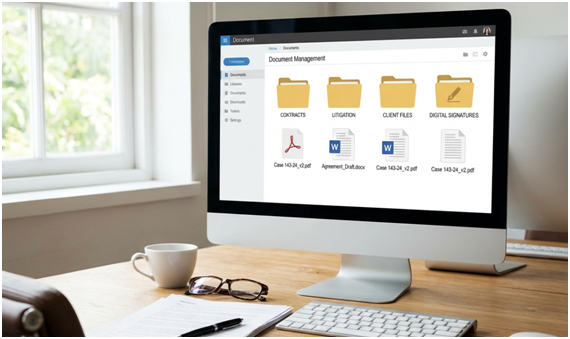
Combining multiple documents into a single PDF file can also help maintain consistent numbering.
Step 2: Open the Document in PDFelement
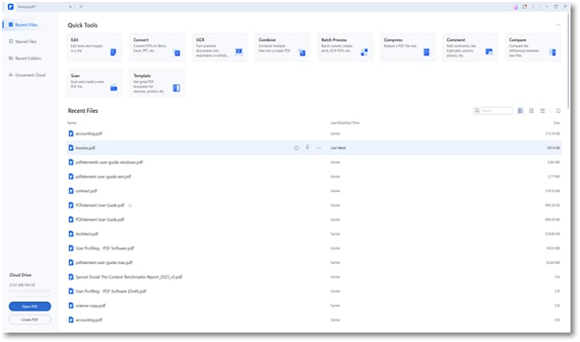
Launch PDFelement and open the PDF file or document batch you want to number.
Step 3: Access the Bates Numbering Feature
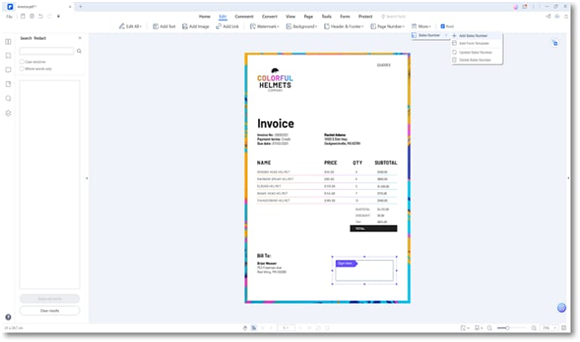
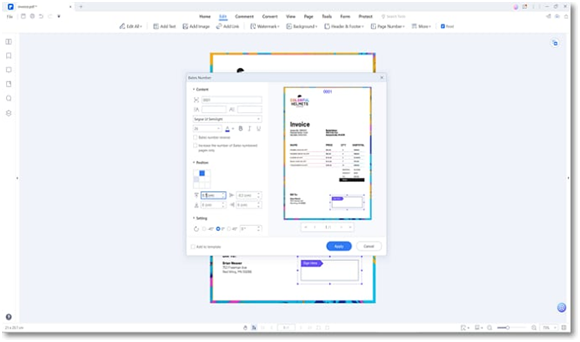
Inside PDFelement. Click Editto edit PDF documents. Select Bates Numbering and choose Add Bates Number.
A configuration window will appear where you can customize your numbering format.
Step 4: Configure the Bates Number Format
Legal teams often customize numbering based on the case or client.
Typical customization options include:
- Prefix (e.g., case name or firm initials)
- Starting number
- Number of digits
- Position on page (top-right, bottom-center, etc.)
Example format: CASEA-000001
This format helps identify the document source while maintaining sequential order.
Step 5: Apply the Numbering
After configuring the settings, click Apply. And The software automatically assigns a unique number to each page and save the updated PDF file
For large document sets, PDFelement allows batch processing, meaning hundreds of files can be numbered simultaneously.This saves significant time during discovery preparation.
Best Practices for Bates Numbering Legal Documents
Applying Bates numbering correctly requires careful planning. Here are several professional tips used in law firms.
1. Establish a Consistent Numbering Convention
Use the same format across all document productions.
Example format: CLIENT-YYYY-000001
Consistency ensures clarity when multiple document sets are exchanged.
2. Avoid Renumbering Documents
Once Bates numbers are assigned and shared during discovery, never renumber them. Doing so can create confusion and disputes.
3. Maintain Version Control
If documents are revised after numbering, save them as separate versions rather than replacing the original.
FAQs About Bates Numbering Legal Documents
What is the difference between Bates numbering and page numbering?
Page numbering simply counts pages within a document. Bates numbering assigns unique identifiers across an entire document set, making each page globally identifiable.
When is Bates numbering required?
Bates numbering is commonly required during:
- Litigation discovery
- Document production
- Court filings
- Legal document review
Many courts expect documents submitted during discovery to include Bates numbers.
Can Microsoft Word apply Bates numbering?
Word can add page numbers but does not support true Bates numbering across multiple documents. Legal professionals typically use dedicated PDF tools like WondersharePDFelement for accurate sequential stamping.
How do law firms manage Bates numbering for large document sets?
Most firms rely on automated PDF software that supports:
- Batch processing
- Custom prefixes
- Sequential numbering
- Document merging
Tools like PDFelement make it possible to number thousands of pages in minutes.
Conclusion
Bates numbering legal documents is an essential practice for organizing, referencing, and managing large volumes of legal materials. Manually stamping documents is inefficient and prone to errors. Instead, legal professionals should use automated tools such as WondersharePDFelement, which allow you to apply Bates numbering quickly, customize numbering formats, and process entire document batches at once.
Join LAWyersClubIndia's network for daily News Updates, Judgment Summaries, Articles, Forum Threads, Online Law Courses, and MUCH MORE!!"

Tags :others


